28 Final Review
Acknowledgements
The first draft of these notes was generated from my lecture notes by Gemini. See the lecture notes for each week for more details.
Technical Project Management
Objective: Distinguish between classical project management (e.g. Waterfall) and agile methodology.
What makes technical projects “special”?
Technical projects (like building a new mobile app) are fundamentally different from traditional projects (like building a bridge) because the primary goal is discovery, not just perfect execution.
| Traditional Projects | Technical Projects | |
|---|---|---|
| Requirements | Fixed, known physics, fixed blueprint. | Changing user needs, blueprint is a hypothesis. |
| Materials | Predictable, tangible (steel, concrete). | Evolving technology, intangible (code). |
| Goal | Execute the plan perfectly. | Discover the right solution. |
Key Challenges & Characteristics:
High Uncertainty: The final solution is often unknown at the start.
Rapidly Changing Technology: Tools and platforms can change mid-project.
Intangible Deliverables: Code is hard to “see,” making progress difficult to measure.
Complex Interdependencies: Small changes can cause unexpected system-wide consequences.
The Leadership Trio: Roles and Focus
Modern technical teams require three distinct leadership roles, each focusing on a specific facet of success:
| Role | Focus/Goal | Key Question | Analogy |
|---|---|---|---|
| Product Manager | The “Why” & “What” | Why are we building this, and what problem does it solve? | The Architect |
| Engineering Manager | The “Who” & “How” (Technical) | Who is best to build this, and how can we build it maintainably? | The Construction Foreman |
| Project Manager | The “When” & “How” (Process) | When will this be done, and how can we streamline the process? | The General Contractor/Scrum Master |
The SDLC: From Waterfall to Agile
The evolution of the Software Development Life Cycle (SDLC) reflects the need to adapt to the inherent uncertainty of technical projects.
The Classic Waterfall Model
Structure: Linear and sequential (Requirements → Design → Implementation → Verification → Maintenance).
Pros: Simple, disciplined, works well when requirements are fixed and understood.
Cons: Extremely rigid. Changes late in the process are catastrophic, and a working product is only delivered at the very end.
The Agile Revolution
Agile is a philosophy built on four core values from the Agile Manifesto:
Individuals and interactions over processes and tools.
Working software over comprehensive documentation.
Customer collaboration over contract negotiation.
Responding to change over following a plan.
Modern Agile Tools:
Scrum: A framework using fixed-length cycles (sprints) with defined roles (Scrum Master, Product Owner) and events (Daily Stand-up, Sprint Review).
Kanban: A flow-based method focused on Visualizing work, Limiting Work in Progress (WIP), and maximizing continuous efficiency.
Reality: Most modern teams use hybrid models, combining principles from different frameworks to suit their unique context.
Project Initiation and Success
Objective: Turn a general idea into an actionable, formal project and establish objective criteria for success.
The Project Charter
The Project Charter is a formal, short document that serves two primary purposes:
- Establish high-level project parameters.
- Grant the authority to initiate the project.
It creates alignment among sponsors, managers, and the team, and establishes a clear baseline to prevent scope creep from day one.
Key Components of a Charter:
Project Title and Purpose: The project’s name and why it is being undertaken.
Project Manager: Identifies who is authorized to lead the project.
Business Case: A concise explanation of the business need or problem the project addresses.
High-level Objectives and Goals: What the project is trying to achieve.
High-level Scope: A broad overview of what is in and out of the project.
Key Stakeholders: The main people or groups affected by or interested in the project.
High-level Budget and Resources: A rough estimate of money and people needed.
Success Criteria: Defines what “done” looks like and how success will be measured.
Stakeholder Management
- Stakeholder: anyone with an interest in or influence over the project (customers, executives, team members, regulators, etc)
- Effective management of these individuals is critical
- Ignoring them risks building the wrong product or having the project killed.
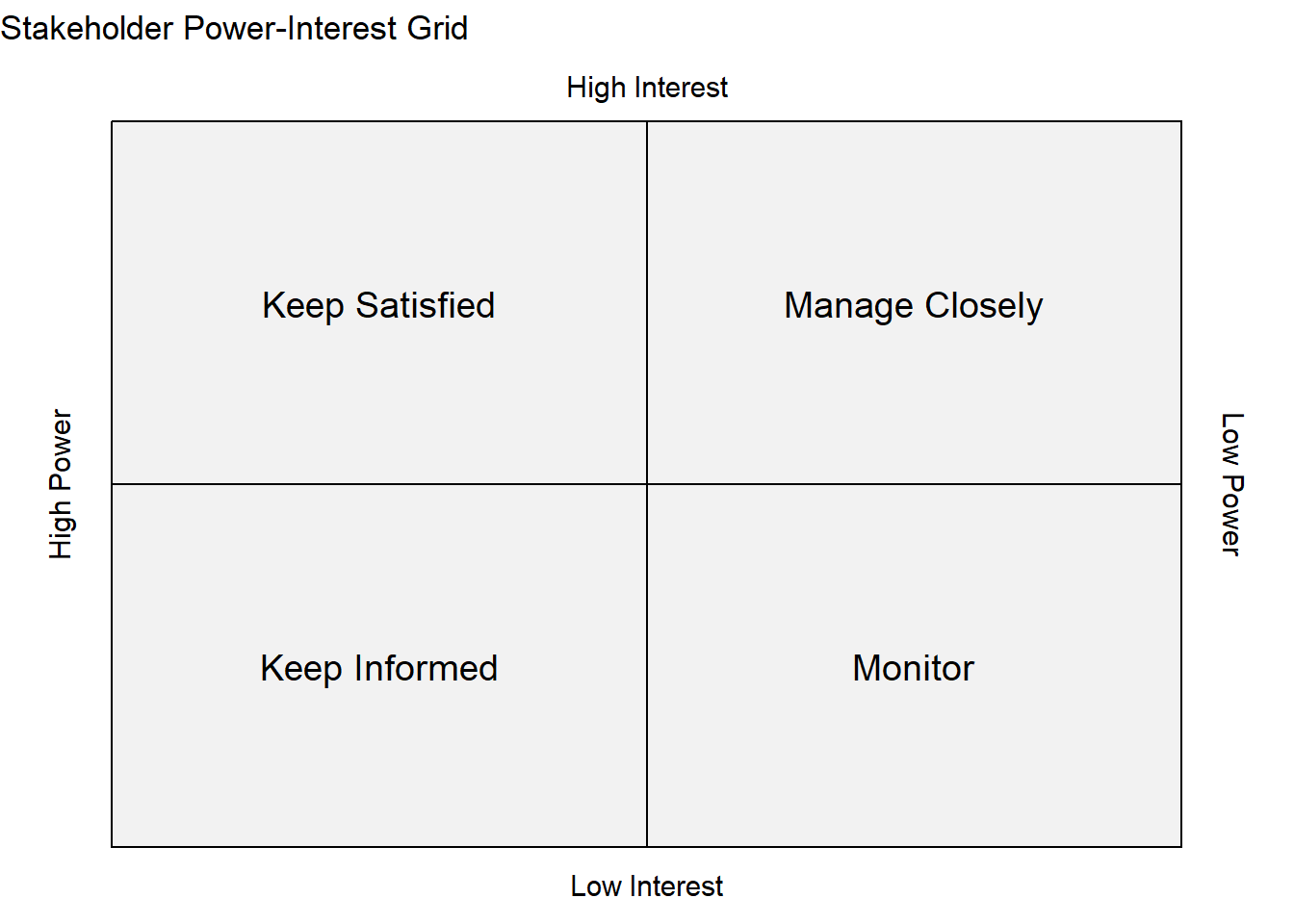
The Power-Interest Grid is a useful tool for analyzing stakeholders and determining the correct engagement strategy:
| Quadrant | Power | Interest | Strategy | Goal |
|---|---|---|---|---|
| Manage Closely | High | High | Keep Engaged | Key players; keep them satisfied and informed. |
| Keep Satisfied | High | Low | Keep Updated | Can shut down the project; provide regular, concise updates. |
| Keep Informed | Low | High | Keep in the Loop | Invested; leverage them as allies. |
| Monitor | Low | Low | Keep an Eye On | Minimize time/resources, but monitor for status changes. |
Defining Project Success: Objectives and KPIs
- Move beyond simply saying “we launched the product”
- Success must be defined through rigorous, measurable definitions
- Defining success early sets a common understanding of what matters
- Provides a clear way to evaluate the project’s ultimate outcome
SMART Objectives
Objectives are the goals or milestones along the path to the finished product. They should adhere to the SMART criteria:
Specific: Clear and well-defined (e.g. “reduce page load time”)
Measurable: You can quantify the achievement (e.g. “by 50%”)
Achievable: Realistic given resources and constraints
Relevant: Aligns with overall business goals
Time-bound: Includes a deadline or specific timeframe
Key Performance Indicators (KPIs)
KPIs track progress toward your objectives. Every KPI must have two components:
A metric that can be measured.
A target tied to the success of an objective.
Common Technical Project KPIs include:
Time to Market
User Adoption Rate
Bug Count (critical bugs post-launch)
Average Issue Response Time
Uptime
Customer Satisfaction Score
Agile Philosophy and the Scrum Framework
Objectives:
- Establish agile as a necessary response to the high uncertainty of technical projects
- Agile is a mindset and a philosophy, not a prescribed process
The Agile Manifesto
Created in 2001, the Agile Manifesto guides software development by prioritizing specific values.
| Value (Prioritized) | Over (Less Prioritized) |
|---|---|
| Individuals and interactions | Processes and tools |
| Working software | Comprehensive documentation |
| Customer collaboration | Contract negotiation |
| Responding to change | Following a plan |
The twelve principles that follow these values emphasize:
- Early and continuous delivery of valuable software
- Welcoming changing requirements
- Promoting face-to-face conversation
- Encouraging self-organizing teams to continuously inspect and adapt their processes
Introduction to Scrum (The “3-5-3” Framework)
Scrum is a lightweight, iterative, and incremental framework for developing solutions within complex project constraints.
3 Roles
| Role | Focus/Responsibility | Key Traits |
|---|---|---|
| Product Owner (PO) | Manages the Product Backlog (the single source of truth); represents the customer/business voice. | Domain expert, Decision-maker, Available. |
| Scrum Master (SM) | A servant-leader who ensures Scrum practices are followed, removes impediments (roadblocks), and facilitates events. | Coach, Facilitator, Protector of the team. |
| Development Team | Self-organizing, cross-functional group that builds the product; responsible for the Sprint Backlog. | Collaborative, Skilled, Empowered. |
5 Events (Ceremonies)
| Event | Timing | Purpose | Output |
|---|---|---|---|
| Sprint | Fixed-length timebox (1-4 weeks) | A mini-project with a specific goal | The Product Increment |
| Sprint Planning | Beginning of Sprint | Define the sprint goal and sprint backlog | The Sprint Backlog |
| Daily Scrum (Stand-up) | Every day (15 minutes) | Development team synchs up and short-term plans (What did I do? What will I do? Impediments?) | Plan for the next 24 hours |
| Sprint Review | End of Sprint | Demonstrate completed work to stakeholders and inspect the Increment | An updated Product Backlog |
| Sprint Retrospective | End of Sprint (after Review) | The Scrum Team inspects itself and plans improvements for the next Sprint | Commitments for process improvement |
3 Artifacts
Product Backlog: The ordered list of everything needed in the product. It is dynamic and owned by the Product Owner.
Sprint Backlog: The plan for the sprint, consisting of the Product Backlog items selected for the current Sprint plus the plan for delivering them.
Product Increment: The sum of all completed Product Backlog items from the current Sprint plus all previous Increments. It must be “Done” and potentially shippable/usable.
Visualizing Workflows with Kanban
Kanban is an agile method that focuses on continuous flow rather than fixed time-boxed iterations (like Scrum).
Visualize the Workflow: Use a Kanban board (e.g. To Do, In Progress, Done) to make the state of work transparent.
Limit Work in Progress (WIP): Set a cap on the number of tasks in the “In Progress” column to prevent multitasking and encourage focus on completion.
Manage Flow: Continuously identify and remove bottlenecks to move items smoothly and quickly from start to finish.
Scrum vs Kanban
Both Scrum and Kanban share fundamental reasons for success: they are based on empiricism (inspection and adaptation), transparency, and an unwavering focus on value.
Kanban is ideal for a constant stream of unpredictable work (like IT support or maintenance) where new tasks arrive at any time and need quick attention
Scrum is better for clear product roadmaps that break into repeatable, time-boxed cycles
Git and Branching Strategies
Objective: Understand git as a version control system used to coordinate collaborative code development, and the major strategies employed to manage development efforts.
Introduction to Git
Git is a distributed version control system that tracks changes to files over time, allowing developers to recall specific versions and work in parallel.
Repository (Repo): A database containing all project files and their complete history.
Commit: A permanent snapshot of the repository at a specific point in time.
Branch: A lightweight, movable pointer to a commit, used to isolate different lines of development.
Basic Git Workflow
The workflow involves managing changes between your local copy and the cloud repository.
Initialization/Update:
git init(new repo) orgit clone(copy from cloud);git pull(get latest changes).Making Changes:
git add(moves changes to the staging area) andgit commit(creates the snapshot).Sharing:
git push(sends commits to the cloud).
Branching Strategies
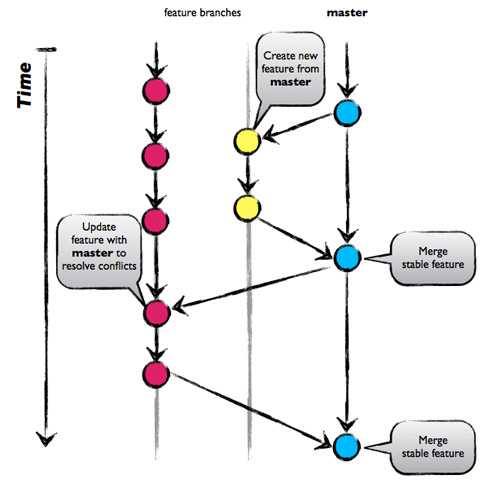
Branching enables parallel development by isolating new features, bug fixes, or experiments from the main codebase.
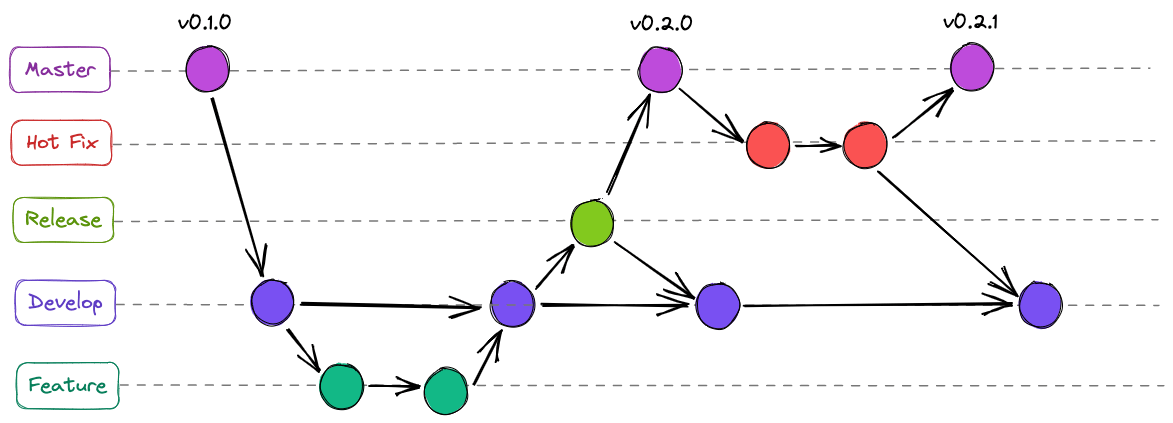
GitFlow
Structure: Heavy and structured, designed for large-scale projects and multiple parallel versions.
Main Branches:
master/main: Always stable, production-ready.dev/develop: Latest integrated code for the next release.
Supporting Branches:
feature/*,release/*,hotfix/*.
Pros: Excellent for managing multiple product versions.
Cons: Can be overly complex, cumbersome, and slows down Continuous Integration/Continuous Delivery (CI/CD).

GitHub Flow
Structure: Simple, focused on Continuous Delivery (CD). The
mainbranch is always deployable.Workflow: Feature branch → Pull Request (PR) → Merge to
main→ Deploy.Pros: Fast, simple, and ideal for teams practicing continuous deployment.
Cons: Not suitable for managing multiple versions or environments.
GitLab Flow
Structure: A hybrid approach that uses dedicated environment branches (e.g.,
production,staging).Workflow: Feature branch → Merge Request (MR) to
main(testing) → Mergemaintostaging(staging environment) → Mergestagingtoproduction(production deployment).Pros: Provides more isolation and works well for projects with multiple deployment environments.
Cons: Does not easily support the management of multiple versions.
Trunk-Based Development
Structure: Developers merge small, frequent changes directly into a single, shared “trunk” (
main) branch.Commit small changes multiple times daily.
Use feature flags to hide incomplete work from users.
Pros: Enables rapid CI/CD and minimizes merge conflicts (“merge hell”).
Cons: Requires a mature, disciplined team and strong, automated testing.
Choosing the Right Strategy
The selection of a branching strategy should be based on:
Simplicity vs. Complexity: Match the strategy to the team size and project needs.
Release Cycle: The strategy must align with your desired release cadence (e.g. continuous vs. scheduled).
Team Discipline: Simpler strategies (like TBD or GitHub Flow) require a higher level of discipline and automated testing from the team.
Managing Work with Jira
Objective: Explored Jira use cases for planning, tracking, and managing work in technical teams. It is built around the fundamental unit of work called an “issue.”
Definitions
Project: A container for a team’s work, configurable for different methodologies (Scrum or Kanban).
Issue: The fundamental unit of work (e.g. User Story, Bug, Task).
Workflow: The defined set of steps an issue follows from creation to completion (e.g. To Do → In Progress → Done).
Scrum vs. Kanban
Jira supports both primary Agile methodologies:
| Scrum | Kanban | |
|---|---|---|
| Cadence | Time-boxed Sprints (e.g., 2 weeks) | Continuous Flow |
| Work in Progress (WIP) | Fixed by the Sprint Backlog | Limited by explicit WIP limits on columns |
| Work Pull | Work is pulled during Sprint Planning | Work is pulled continuously as capacity allows |
| Flexibility | Changes are discouraged mid-sprint | Changes can be introduced at any time |
| Core Artifacts | Backlog, Sprint Backlog, Sprint Goal | Visual Flow, WIP Limits |
Defining Work: User Stories and Acceptance Criteria
Effective work management relies on clearly articulating what needs to be built and when it is finished.
Writing Effective User Stories
User Story: A short, simple description of a feature from the end user’s perspective, articulating the value to them.
Format:
As a [user role],
I want to [goal/action],
so that [reason/benefit].
Example: As a registered Pizza App user, I want to find my favorite pizza, so that I can order dinner.
Acceptance Criteria
Acceptance criteria define the conditions that must be met for a user story to be considered “done.” They often use the Given/When/Then structure:
Given [initial context]
When [action is performed]
Then [observable outcome]
Example: Given a registered Pizza App user, When they find and order a pizza, Then it shows up in the shopping cart.
Building and Prioritizing a Backlog
The Backlog is the single, prioritized source of truth for all work. It must be continuously refined to ensure the most valuable work is done first.
Prioritization Techniques
MoSCoW Method: Issues are categorized to quickly determine relative priority:
Must have: Essential for product function
Should have: Important but not critical
Could have: Nice to have
Won’t have: Not a priority for this release
ICE Scoring: A simple quantitative model for scoring issues:
Impact: Value delivered
Confidence: Certainty that the solution will work
Ease: Difficulty of implementation
Work Types and Hierarchy
Work can be organized into a parent-child relationship for better management:
Epic: Broad, high-level ideas (a collection of issues)
Standard Issues: Regular tasks, User Stories, Bugs, etc
Subtask Issues: Used to break down a Standard Issue into smaller, actionable units of work
GitHub Actions and CI/CD Automation
Objectives:
- Introduce GitHub Actions, a powerful CI/CD (Continuous Integration/Continuous Delivery) platform built directly into GitHub
- GitHub Actions automate the software delivery process from code commit to deployment
Continuous Integration and Delivery
Automation is essential for modern technical teams:
Continuous Integration (CI): The practice of frequently merging all developers’ working copies of code into a shared
mainbranch.Continuous Delivery (CD): The engineering approach ensuring software can be reliably released at any time, requiring automation for testing, building, and deploying.
GitHub Actions provides this automation, allowing you to customize and execute software development workflows right in your repository.
GitHub Actions
Workflow: Defined in a YAML (
.yml) file in the.github/workflows/directory. A repository can have multiple workflows.Events: Triggers that cause a workflow to run. Common examples include
push,pull_request, scheduled runs (cron), or manual runs (workflow_dispatch).Jobs: A set of steps that execute on the same runner.
Jobs run in parallel by default.
Use the
needskeyword to define dependencies and ensure jobs run sequentially (e.g.deployneedsbuild).
Steps: Individual tasks within a job, executed sequentially.
- Can be a shell command (
run:) or a reusable action (uses:).
- Can be a shell command (
Actions: Reusable units of code for specific tasks (e.g.
actions/checkout@v4to download your code). Available via the GitHub Marketplace.Runners: The server environment where the job executes.
GitHub-hosted: Virtual machines provided by GitHub (e.g.
ubuntu-latest,windows-latest).Self-hosted: Your own server, giving you control over the environment.
Advanced Workflow Features
Managing Secrets: Sensitive data (API keys) must be stored outside the workflow file (in Settings > Secrets) and accessed securely using
{{secrets.SECRET_NAME}}.Caching: Saves dependencies (like installed packages) between workflow runs, significantly speeding up build times.
Matrix Builds: A strategy that runs a single job across multiple configurations (e.g. testing Node.js v18 and v20 on both Linux and Windows) to ensure compatibility.
Reusable Workflows: Centralizing common CI/CD patterns so multiple repositories can call a single, consistent workflow.
Agentic Programming
Objective: Introduced agentic programming and considerations for project management
Passive LLMs vs. Agentic LLMs
| Passive LLMs | Agentic LLMs | |
|---|---|---|
| Example | ChatGPT | GitHub Copilot CLI |
| Input | A direct prompt | A high-level goal |
| Output | A single, one-shot response/generation | A sequence of actions and refined outputs |
| Process | Generate and stop | Operates in a continuous loop, taking actions until the goal is achieved |
| Tools | None (or only internal data) | Uses external tools (file read/write, code execution, search) |
The Agentic Loop (P-A-O-R)
| Step | Action | Description |
|---|---|---|
| Plan | Reasoning | Decomposes the high-level goal into a sequence of executable steps (sub-goals). |
| Act | Tool Use | Executes the current step, often by calling an external tool (e.g. running a test, writing a file). |
| Observe | Feedback | Receives the result of the action (e.g. a test failure, a file read output, a compiler error). |
| Refine | Correction | The LLM analyzes the observation, updates its internal state, and adjusts the original plan for the next iteration. |
Benefits and Use Cases
Agentic capabilities are valuable for tackling complex, real-world development tasks by overcoming the limitations of single-shot generation.
Multi-step Problem Solving: Agents can handle tasks requiring many sequential decisions (though complexity increases the risk of error).
Tool Integration: They interact with the external environment, allowing them to read/write files and execute code, connecting the LLM to the real world.
Iterative Refinement: Agents automatically learn from errors (like a failed test) and attempt to debug and fix the code without continuous human supervision.
Autonomy: Allows developers to delegate entire workflows instead of just single code snippets.
Best Practices for Working with Agents
Effective collaboration with agentic tools requires specific approaches:
Define the Goal, Not the Steps: Write prompts focusing on what you want (the outcome), allowing the agent to handle how it gets there (the plan).
Inspect the Reasoning Chain: Always review the agent’s initial Plan or internal monologue to intervene early if the logic is flawed.
Use Version Control Heavily (Git): Agents make rapid, sweeping changes. Always commit or stash work before running an agent and use
git diffimmediately afterward to review all modifications.Provide Specific Feedback: When an agent makes a mistake, specify the exact failure (e.g. “The function is failing for negative inputs”) instead of giving vague instructions.
Building and Leading High-Performance Teams
Objective: Review team dynamics and best practices for developing high performing teams
Characteristics of High-Performance Teams
Shared Vision & Goals: Every member understands the destination and the “why”
Clear Roles: No ambiguity in responsibilities; individual contributions are effective
Trust & Safety: Belief in competence and intentions; psychological safety is present
Constructive Conflict: Disagreements are viewed as a path to better solutions, not personal attacks
Accountability: Members own their commitments and outcomes
Tuckman’s Stages of Group Development
Teams follow a predictable lifecycle. The leader’s role shifts as the team evolves.
Stage 1: Forming (“Hello, How Are You?”)
Characteristics: Politeness, uncertainty about roles, reliance on the leader.
Leader’s Role: Directive. Define goals, facilitate introductions, and establish ground rules.
Stage 2: Storming (“Can We Agree?”)
Characteristics: Personality clashes, power struggles, resistance to methods.
Leader’s Role: Coach/Mediator. Address conflict directly, reinforce vision, encourage respectful debate.
Stage 3: Norming (“Finding Our Groove”)
Characteristics: Increased cohesion, established processes, trust forms.
Leader’s Role: Facilitator. Reinforce positive norms, step back, and empower the team.
Stage 4: Performing (“In Sync”)
Characteristics: High productivity, self-organizing, interdependent problem solving.
Leader’s Role: Delegator/Supporter. Remove obstacles, celebrate success, foster innovation.
Stage 5: Adjourning (“Until Next Time”)
Characteristics: Disbanding of temporary teams; feelings of loss or celebration.
Leader’s Role: Closure. Celebrate achievements and facilitate knowledge transfer.
Fostering Psychological Safety
Based on Amy Edmondson’s work and Google’s Project Aristotle.
Psychological Safety: A shared belief that the team is safe for interpersonal risk-taking (asking questions, admitting mistakes, offering ideas).
The #1 predictor of team effectiveness; leads to higher innovation, retention, and error reduction.
How Leaders Build It:
Frame the work: Emphasize shared purpose.
Model vulnerability: Admit own mistakes.
Normalize failure: Treat it as a learning opportunity.
Encourage voice: Actively solicit input and respond constructively.
Conflict Resolution
- Conflict is inevitable; dysfunction is optional
- “Good conflict” challenges ideas; “Bad conflict” attacks people
- Allowing your team to resolve their own conflict is ideal, but mediate when necessary
Resolution Strategies:
Active Listening: Understand all perspectives
Depersonalize: Focus on the issue, not the person
Find Common Ground: Identify shared goals
Mediate: Guide discussion and set boundaries for civility
Constructive Feedback
Feedback is for growth, not just correction.
The SBI Model:
Situation: Be specific about when/where (“In the meeting last Tuesday…”).
Behavior: Describe the observable action (“…you interrupted Sarah twice…”).
Impact: Describe the result (“…which undermined her credibility.”).
Giving Feedback: Make it timely, specific, and action-oriented. Praise in public, correct in private.
Receiving Feedback: Listen active, seek clarification, avoid defensiveness, and thank the giver.
Effective Communication and Stakeholder Management
Objectives:
- Review communication strategies for different audiences and stakeholders
- Learn the importance of understanding and managing stakeholder expectations
- Review management strategies for leading through times of change
Crafting Communications for Different Audiences
Communication must be tailored based on the audience’s technical depth, interest, and influence.
- Audience Analysis: Use the Power-Interest Grid to determine engagement strategy.
The Technical Audience:
Focus: Accuracy, detail, methodology, data.
Format: Architecture diagrams, code snippets, Jira updates.
Language: Precise technical jargon is acceptable and builds credibility.
The Executive Audience:
Focus: Impact, Status (RAG - Red/Amber/Green), Cost, Risk, “So What?”
Format: Dashboards, Executive Summaries, High-level slides (3-5 max).
Method: The Pyramid Principle — Start with the conclusion/answer, then provide supporting details.
Meeting Management
“It takes a really good meeting to be better than no meeting at all.”
Pre-Meeting Discipline:
The Filter: Challenge the need for the meeting. Can it be an email?
The Agenda: Must be circulated in advance with clear objectives.
The “Two Pizza Rule”: Limit attendees to a number that can be fed by two pizzas (essential decision-makers only).
During the Meeting:
Start and end on time to show respect.
Roles: Assign a Facilitator (parks tangents) and a Scribe (notes).
Decision Making Frameworks:
RACI: Responsible (does work), Accountable (owner/delegator), Consulted (SME), Informed (updated).
DACI: Driver (coordinator), Approver (final say), Contributor (input), Informed.
- Post-Meeting: Send specific Action Items (Who, What, When) within 24 hours.
Managing Stakeholder Expectations
Proactive communication prevents scope creep and dissatisfaction.
Stakeholder Mapping: Identify who has influence and interest using the Power/Interest grid.
Communication Plan: Formalize the what, when, and how of updates.
Managing Scope:
Trade-offs: When new requests arrive, ask: “Which current priority will this replace?”
Baseline: Under-promise and over-deliver. Never promise what cannot be guaranteed.
Leading Teams Through Uncertainty
Using the Who Moved My Cheese framework to understand change psychology.
The Characters & The Lesson:
Cheese: Represents stability (job, tech stack, strategy).
Sniff & Scurry (The Mice): Proactive; they act quickly when stability is lost.
Hem & Haw (The Little People): Resistant; they overanalyze or deny change.
Goal: Move the team from “Hemming” (paralysis) to “Hawing” (adaptation).
Reassuring Technical Teams:
Shrink the Horizon: Focus only on the next 1-2 sprints to create a localized sense of control.
Filter, Don’t Transmit: Block executive noise/rumors; pass on only confirmed, actionable info.
Normalize Fear: Validate feelings to reduce anxiety.
Defend Focus: Protect the team from unnecessary interruptions to allow them to find “success today.”
Metrics & Estimation
Objective:
- Understand how to estimate and quantify work
- Review methods for using these metrics to track and forecast team productivity
The Challenge of Estimation
Human beings are naturally poor at absolute estimation (hours/days) due to cognitive biases.
Optimism Bias: Underestimating complexity and potential roadblocks.
Planning Fallacy: Ignoring historical data from similar past projects.
Anchoring: Fixating on the first number mentioned, even if irrelevant.
Parkinson’s Law: “Work expands so as to fill the time available for its completion.” (e.g. a 3-day task takes 5 days if given 5 days).
Relative Estimation & Story Points
To combat biases, we switch from “How long?” to “How big is this relative to that?”
Benefits: Removes emotion, focuses on complexity/uncertainty rather than time, and builds team consensus.
Story Points: An abstract unit of measure representing:
Complexity: Intricacy of logic.
Uncertainty: Unknowns and research required.
Effort: Volume of work.
The Fibonacci Sequence: Used for scoring (1, 2, 3, 5, 8, 13…) to reflect that uncertainty grows with size.
Planning Poker: A technique where team members reveal estimates simultaneously to prevent anchoring and spark debate on outliers.
Agile Metrics (Flow & Velocity)
Definition of Done (DoD): A non-negotiable checklist (code reviewed, tests passed, PO accepted) that acts as the single source of truth for completion.
Lead Time: Time from Idea \(\rightarrow\) Delivery (Market responsiveness).
Cycle Time: Time from Work Start \(\rightarrow\) Work End (Engineering efficiency).
Velocity: Sum of Story Points completed per sprint. Used for forecasting capacity, not for performance evaluation.
Visualizing Progress
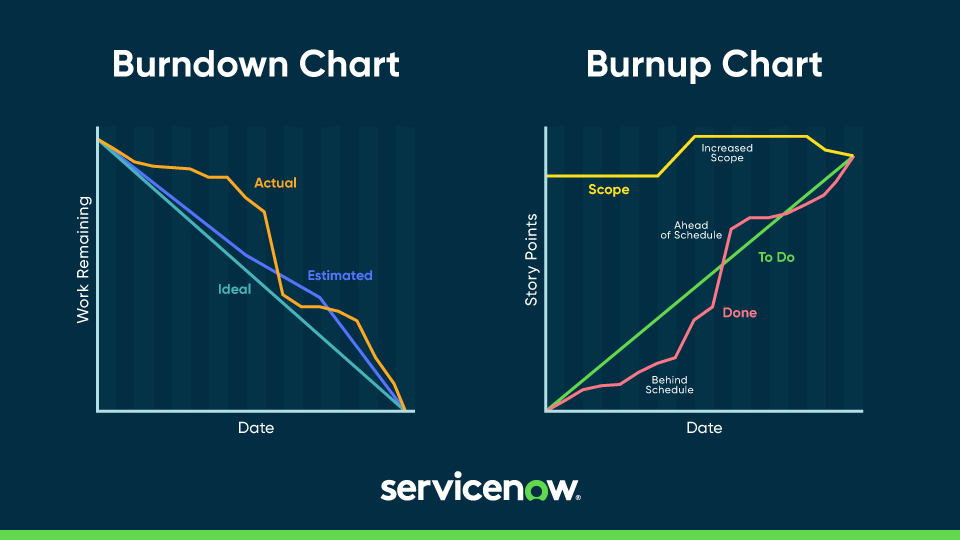
Burndown Chart: Tracks remaining work over time. If the actual line is above the ideal line, the project is behind.
Burnup Chart: Tracks completed work over time against Total Scope. This is superior for visualizing scope creep (when the total scope line rises).
Risk Management
Objective:
- Understand the impact of risk on a project
- Review methods for risk mitigation
A risk is an uncertain event with a positive or negative effect on objectives.
Risk Score Formula: Probability (P) x Impact (I).
Identification Categories: Technical (unproven tech), Schedule (dependencies), Resource (skills gap), External (market shifts).
Risk Mitigation Strategies
For every significant risk, a specific response strategy is required:
Transfer: Shift responsibility to a third party (e.g. insurance, outsourcing)
Avoid: Eliminate the threat by changing the plan/scope
Mitigate: Reduce the Probability or Impact (e.g. building a Proof of Concept)
Accept: Acknowledge the risk but take no action (e.g. set aside contingency budget)
The Risk Register: A centralized log for tracking risks