11 Managing work with Jira
Acknowledgements
Gemini was used for organization, diagram debugging and brainstorming during the preparation of these notes.
Introduction to Atlassian’s Jira
Jira is a tool issue and project tracking, developed by Atlassian.
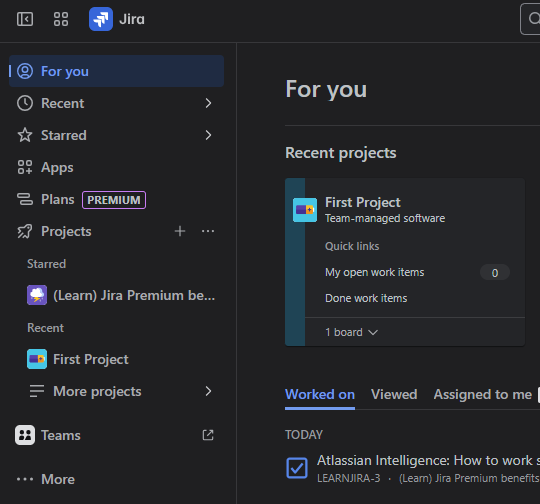
- Used in:
- Software development
- IT
- Business
- Used for:
- Planning,
- Tracking and
- Managing work
- Built around the concept of “issues”
- Tasks
- Bugs
- User stories
- Any other unit of work
Key Concepts
- Project
- A container for a team’s work
- Can be configured for different methodologies (e.g., Scrum, Kanban)
- Issue
- Fundamental unit of work in Jira
- Something that needs to be done (i.e. User Story, Bug, Task, …)
- Workflow
- Set of steps an issue goes through from creation to completion
- Typical workflow might include To Do, In Progress, and Done
Picking a project type
Jira’s supports different agile methodologies (wright_choosing_2024?).
Scrum
Designed for teams that work in fixed-length iterations called sprints. The primary focus is on completing a set amount of work within a sprint.
Backlog: A prioritized list of all potential issues (i.e. things that need to get done)
Sprint Backlog: A specific subset of the team’s total backlog that is planned for the current sprint
Sprint Goal: A short summary of the work to be completed in a sprint
Columns: Typically include To Do, In Progress, and Done, which track the status of issues in the sprint.
Kanban
Designed for teams that focus on continuous flow and limiting work in progress (WIP). Work is pulled continuously as capacity allows instead of working in sprints.
Visual Flow: Clear visual representation of the workflow
WIP Limits: Limits on the number of issues that can be in each column (e.g., a maximum of 3 issues in the “In Progress” column).
- No Sprints: Work is pulled from the backlog into the first column as team members become available. As soon as a team member finishes a task, they pull a new one from the preceding column, creating a continuous flow of work through the system.
Scrum vs Kanban
| Feature | Scrum | Kanban |
|---|---|---|
| Cadence | Time-boxed Sprints (e.g., 2 weeks) | Continuous Flow |
| Work in Progress | Fixed by Sprint Backlog | Limited by WIP limits |
| Roles | Defined (Scrum Master, Product Owner) | Flexible, team-driven |
| Planning | Sprint Planning at start of each sprint | Continuous, as needed |
| Flexibility | Changes are discouraged mid-sprint | Changes can be introduced at any time |
Writing Effective User Stories and Acceptance Criteria
A user story is a short, simple description of a feature from the perspective of the person who wants it (Cohn 2025). The goal is to articulate the value to the end user.
User Stories
- As a [user role],
- I want to [goal/action],
- so that [reason/benefit].
Example User Stories
- As a registered Pizza App user, I want to find my favorite pizza, so that I can order dinner.
- As a Pizza App user, I want to save my payment information, so that I can complete orders more quickly in the future.
Acceptance Criteria
Acceptance criteria are the conditions that must be met for a user story to be considered “done” (“Acceptance Criteria: Purposes, Types, Examples and Best Prac” 2023).
- Given [the initial context]
- When [the action is performed]
- Then [the observable outcome]
Example for the “find a pizza” story:
- Given: I am on the menu tab
- When: I scroll through the menu and find the pizza I tap “add”
- Then: The selected pizza should be added to the shopping cart
Building and Prioritizing a Backlog
The backlog is the single source of truth for all work that needs to be done on a project. It is a prioritized list of issues (i.e. user stories, bugs, tasks…)
Building the Backlog
- Gather all potential issues from various sources (stakeholders, customers, team members).
- For each issue, write a clear user story and define its acceptance criteria.
- Log each issue in Jira as a new item in the backlog.
Prioritizing the Backlog
The backlog must be continuously refined and prioritized to ensure the most valuable work is being done first.
Common Prioritization Techniques
- MoSCoW Method: Issues are categorized into four groups (Business n.d.)
- Must have: Essential for the product to function.
- Should have: Important but not critical.
- Could have: Nice to have, but not necessary.
- Won’t have: Not a priority for this release.
- ICE Scoring: A simple model where each issue is scored on three factors (admin 2019):
- Impact: How much value will this deliver?
- Confidence: How certain are we that it will work?
- Ease: How easy is it to implement?
In Jira, prioritization is as simple as dragging and dropping issues to the top of the backlog, with the highest-priority items at the top.
Work types
Work types are used to organize and flag different types of work.
- Parent-child issues have a defined relationship between issues - for example:
- Epic issues are broad, high-level ideas in Jira - a collection of issues
- Standard issues are regular tasks, user stories, bugs, etc…
- Subtask issues can be used to break standard issues down in to smaller units of work